
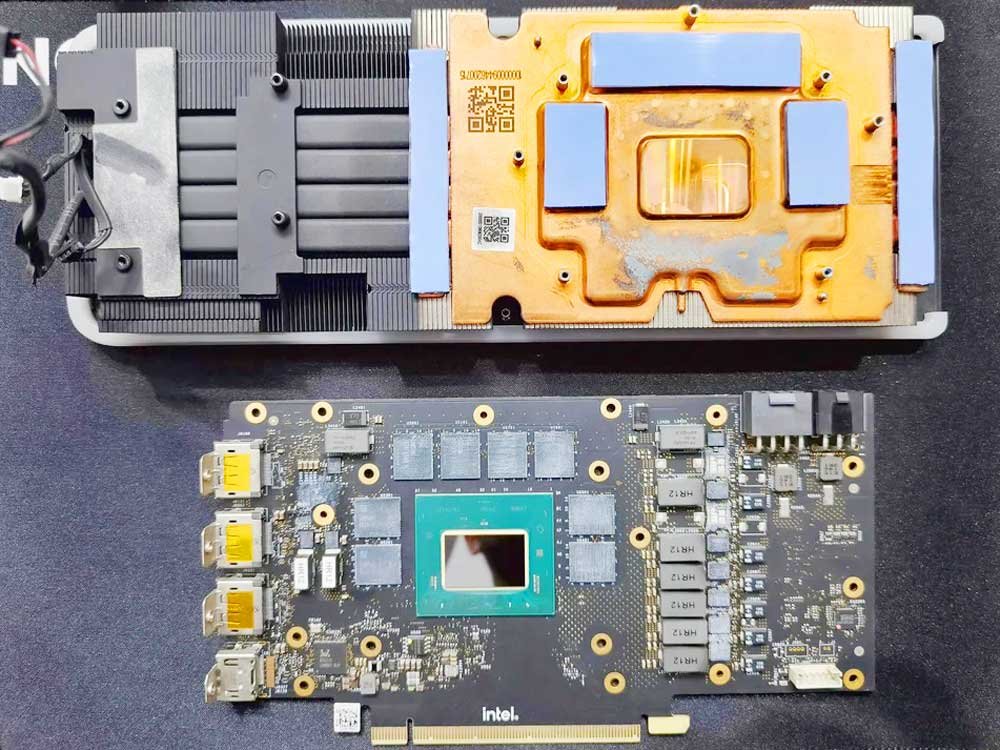
Efficient VRAM cooling is critical for maintaining GPU performance, stability, and lifespan—especially for gaming, rendering, AI workloads, and crypto mining. One of the most effective and affordable solutions is using the correct thermal pads for VRAM. This guide explains how to choose the right thermal pads, what specifications matter most, and common mistakes to avoid.
Why VRAM Needs Thermal Pads
VRAM (Video Random Access Memory) generates significant heat during high-load operations. Unlike GPU cores that use thermal paste and direct heatsinks, VRAM chips rely on thermal pads to transfer heat to heat spreaders, heatsinks, or backplates. Poor-quality or incorrect pads can cause thermal throttling, reduced performance, or even hardware damage.
Key Factors When Choosing Thermal Pads for VRAM
1. Thermal Conductivity
Thermal conductivity is measured in W/m·K. For VRAM applications:
- 6–8 W/m·K: Entry-level, acceptable for light workloads
- 8–12 W/m·K: Recommended for gaming and professional GPUs
- 12+ W/m·K: High-performance setups and overclocking
Higher conductivity improves heat transfer but must be paired with correct thickness.
2. Thickness Matters Most
Using the wrong thickness is the most common mistake.
- Common VRAM pad thickness: 0.5mm, 1.0mm, 1.5mm, 2.0mm
- Too thin → poor contact
- Too thick → uneven pressure, reduced cooling, PCB stress
Always measure the original pad or check GPU teardown guides before replacing.
3. Compressibility and Softness
VRAM thermal pads should be soft and compressible to ensure full contact across uneven surfaces. Pads that are too hard may not conform properly, reducing thermal efficiency.
4. Electrical Insulation
High-quality thermal pads are electrically non-conductive, protecting sensitive VRAM components from short circuits while transferring heat efficiently.
5. Long-Term Stability
Choose pads that:
- Resist oil bleed
- Maintain elasticity over time
- Withstand temperatures above 150°C
This ensures consistent performance over years of use.
Recommended Thermal Pad Types for VRAM
- Silicone-based thermal pads (most common, reliable, easy to install)
- High-performance ceramic-filled pads (better conductivity, higher cost)
- Ultra-thin thermal gap fillers (for compact GPU designs)
Avoid low-grade foam or generic pads not rated for electronics.
When Should You Replace VRAM Thermal Pads?
- GPU memory temperatures exceed 90–100°C
- Visible oil leakage or hardened pads
- GPU disassembly for upgrades or maintenance
- Performance drops due to thermal throttling
Replacing thermal pads is especially common for RTX 30/40 series GPUs and mining cards.
Final Tips for Best VRAM Cooling
- Clean surfaces before installation
- Do not stack pads to adjust thickness
- Avoid stretching or tearing pads
- Pair high-quality thermal pads with proper airflow
Conclusion
Choosing the right thermal pads for VRAM is essential for optimal GPU cooling and long-term reliability. Focus on correct thickness, sufficient thermal conductivity, softness, and durability rather than just the highest W/m·K number. With the right thermal pads, you can significantly reduce VRAM temperatures and unlock stable, high-performance operation.
Need help developing your VRAM Thermal Pads and Thermal Interface Material (TIM) solutions? Contact Yousan today to start your custom project.
If you would like to learn more about Yousan adhesive tapes, please visit our website at www.ysdiecut.com